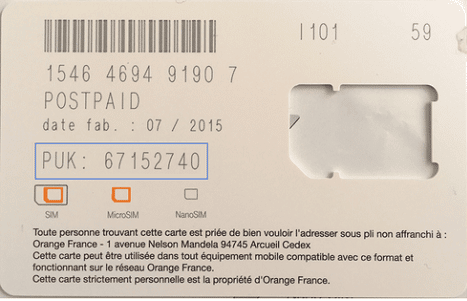
You may have heard of the PUK Code before, without knowing what it was. But when you need it, you must be able to find it as quickly as possible because it is with these 8 digits that you can unlock your mobile phone if you have entered several incorrect PIN codes!
We explain where to find this PUK code, how it differs from the PIN and the IMEI, and what to do if you lose it!
All about PUK
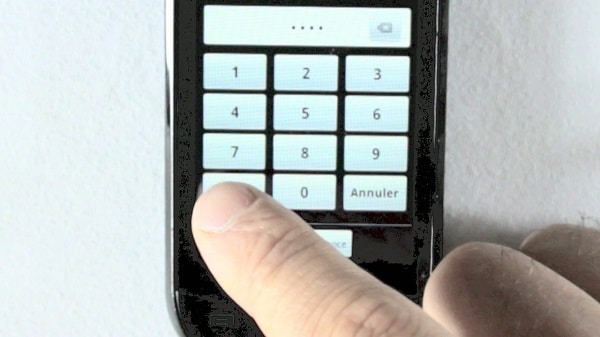
The PUK code is the key to unlocking your mobile phone and consists of 8 digits without spaces. You will be prompted if you have entered 3 incorrect PIN codes in a row!
It happens that you forget your mobile lock code, but not remembering your PIN code is just as common because many of us do not turn off our smartphones frequently. When you do, whether intentionally or when it shuts down by itself while the battery is empty, we often have this reaction: I hope I remember my PIN code!
This kind of situation will lead to smartphone lockouts. Hesitating, you enter your first PIN code, which turns out to be wrong, you try the second one with no more success, and you tell yourself that the last attempt will be the right one. Unfortunately, that’s not the case, and the phone locks up!
A message appears on the screen: please enter your PUK code. If you don’t have it on hand, your phone will be locked until you can provide this unlocking key.
This security measure is important, especially in case of loss or theft of a phone, as it prevents a malicious user from accessing the information contained in your phone. But if you need to unlock your smartphone, it is essential to have your PUK code.
So where to find this PUK code as quickly as possible!
Simply retrieve your PUK code: where to find it?
To retrieve your PUK code, you have 4 options:
- The first is to check the contract you signed when you subscribed. With this paper, which also contains your number, your SIM card number, the IMEI code that will be useful for unlocking your phone, and your PIN code, you will find the PUK code. The problem is that often we don’t know where this sheet is!
- There is a second solution to call your customer service. In this case, you will need to call a different line than your own because you will have to provide the number on your SIM card (you can write it down beforehand…) and prove your identity. This PUK code is personal and cannot be given to anyone other than the line holder.
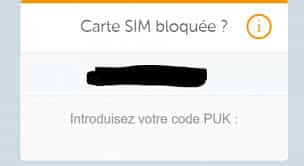
- Don’t want to wait on the phone? Then, you can visit your operator’s website and go to your customer area. You will find a Support (or Troubleshooting) tab, and with your login details, you will be able to find the PUK code.
- Finally, in-store, you can request the PUK code associated with your SIM card, as long as you can prove that you are the owner of the line!
Depending on the operator you are with, there are procedures that sometimes differ slightly. With FREE, for example, you must request your code through your customer area before receiving it by email.
Retrieving your PUK code is therefore as simple as it is quick. No need to dramatize if you lock your phone! Now, we need to understand the difference between the different codes!
PUK Code, PIN Code, and IMEI Code: what are the differences?
In the world of mobile telephony, there are several types of codes, which are sometimes confused with each other by users. Here’s a review of these sets of numbers and their functions.
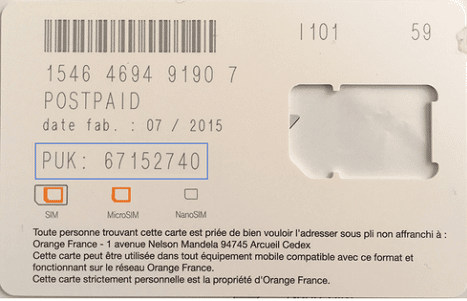
- PUK Code: these are the 8 digits that will be requested when you enter 3 wrong PIN codes. It is therefore used to unlock your smartphone.
- IMEI Code: This is a series of 15 to 17 digits that serves as an identification code for your phone. It is unique to each individual and is assigned to them when they open a mobile phone line. It is essential for tracking a device, whether it is an Orange mobile, a phone locked with SFR or Bouygues, but also for special cases of unlocking an iPhone.
- PIN Code: it is used to unlock your phone and corresponds to the security key of your SIM card. This personal identification number is provided to you along with your SIM card, but you can change it as you wish. The important thing is to remember it!
- RIO Code: This is a crucial code if you want to change operators easily and request portability, allowing you to keep your phone number.
 |
Don’t lose your phone number |
| To easily obtain your RIO code, the simplest way is to dial 3179. This procedure is 100% free, and you will receive this code in a few seconds via voice and SMS. It’s easy! |
As you understand, each of these codes has its own function, and it is good to know where to find your PUK code, how to easily find your IMEI code, and how to obtain your RIO code. Regarding the PUK code, we will add the following tips.
Getting your PUK code: practical information
It is important to know that once you have entered the PUK code, you will need to change your PIN code. Choose a code that you will remember, and if possible, write it down in a safe place so that you do not have to repeat this operation every time.
Finally, even though it is quite rare, know that if you enter 10 consecutive incorrect PUK codes, your SIM card will be permanently unusable! Don’t take the risk of typing anything.
You now know everything about CodePuk!
Tag: blocked SIM card